
 Image 1 of 1
If you've ever had 17 tabs open...
Your captions in Notes.
Your content ideas in a random Google Doc.
Client feedback buried in Instagram DMs.
And you're 99% sure you already wrote this Reel idea somewhere...
...hi. Me too. 🙃
I finally got tired of piecing together my content process every single month.
So I built one place for everything.
Not just a calendar.
Not just a content planner.
A workspace that takes your content from "Wait...what should I post?" all the way to published.
Whether you're managing your own business or juggling multiple clients, this template keeps your entire content workflow organized without making things overly complicated.
✨ Plan every post from start to finish.
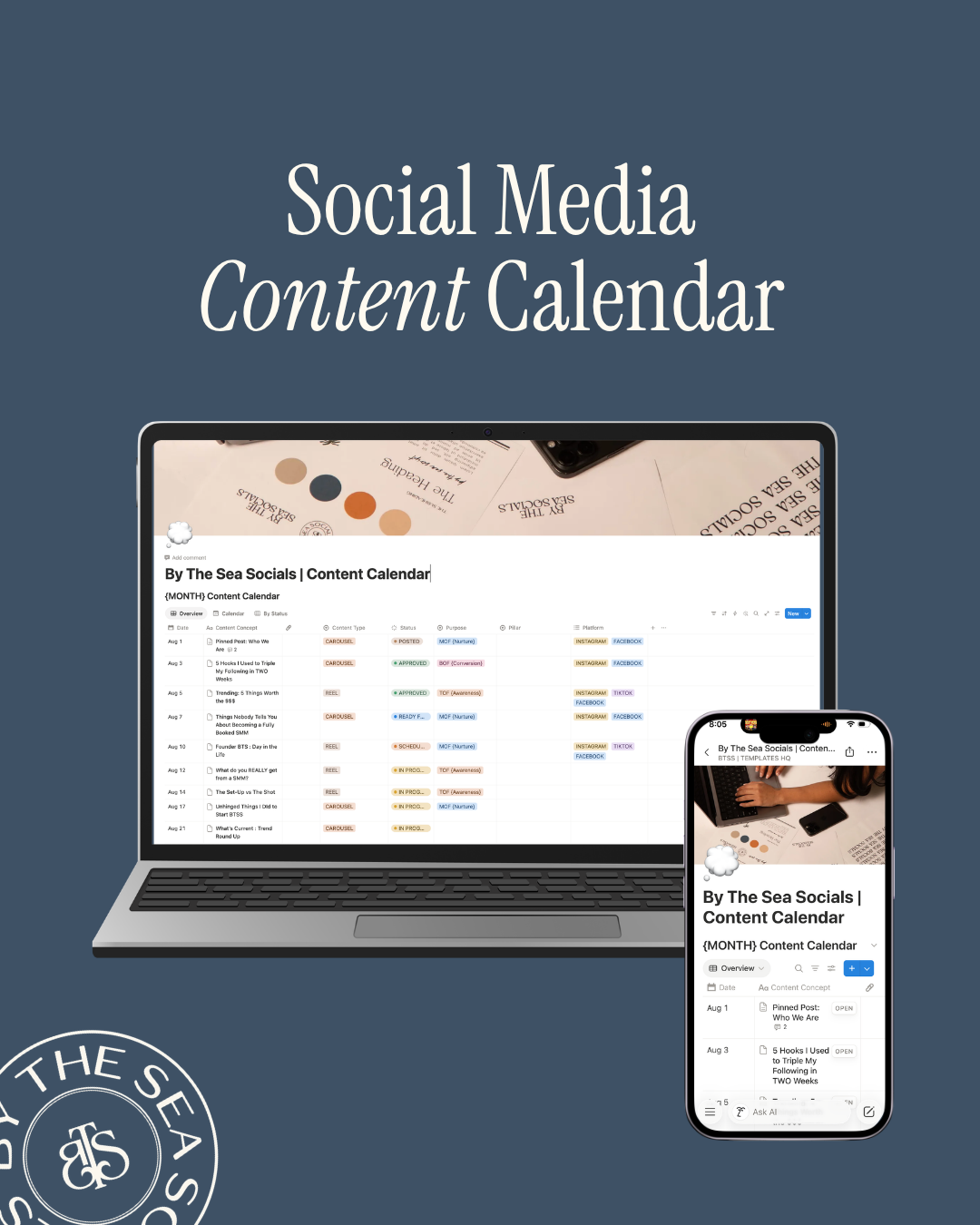
Each piece of content has a home for:
• Content concept
• Caption
• Content format (Reel, Carousel, Graphic, etc.)
• Platform
• Customer Journey Stage (Top, Middle, Bottom of Funnel)
• Publish date
• Status
No more wondering where an idea went or if a post is actually ready.
Switch between:
• Calendar View
• Overview Board
• Status View
So whether you're mapping out next month or checking what still needs edits, everything is only a click away.
This might honestly be my favorite part.
Instead of emailing links back and forth or chasing clients through text messages...
Simply share your template via a LINK.
Your client can:
✔️ Review content
✔️ Leave comments
✔️ Mark posts as Approved
✔️ Request revisions
All inside the same workspace.
No more wondering which version is the final version.
🤍 Social Media Managers
🤍 Content Creators
🤍 Business Owners managing their own marketing
🤍 Virtual Assistants
🤍 Anyone who wants a cleaner content workflow
Whether you're planning one brand or ten, this template helps you stay organized without overcomplicating your process.
I genuinely believe creating content is hard enough.
Keeping track of it shouldn't be.
This is the exact style of system I use to organize ideas, plan strategy, keep content moving, and make approvals way less chaotic.
Less scrambling.
Less searching.
Less "Wait...did they approve this?"
More creating.
More strategy.
More actually enjoying the process.
Ready to make your content workflow feel a whole lot easier?
IMPORTANT! Once you receive your link, you MUST duplicate to use. (Hit the 2 squares in the top right corner) Any issues, email hello@bytheseasocials.com
If you've ever had 17 tabs open...
Your captions in Notes.
Your content ideas in a random Google Doc.
Client feedback buried in Instagram DMs.
And you're 99% sure you already wrote this Reel idea somewhere...
...hi. Me too. 🙃
I finally got tired of piecing together my content process every single month.
So I built one place for everything.
Not just a calendar.
Not just a content planner.
A workspace that takes your content from "Wait...what should I post?" all the way to published.
Whether you're managing your own business or juggling multiple clients, this template keeps your entire content workflow organized without making things overly complicated.
✨ Plan every post from start to finish.
Each piece of content has a home for:
• Content concept
• Caption
• Content format (Reel, Carousel, Graphic, etc.)
• Platform
• Customer Journey Stage (Top, Middle, Bottom of Funnel)
• Publish date
• Status
No more wondering where an idea went or if a post is actually ready.
Switch between:
• Calendar View
• Overview Board
• Status View
So whether you're mapping out next month or checking what still needs edits, everything is only a click away.
This might honestly be my favorite part.
Instead of emailing links back and forth or chasing clients through text messages...
Simply share your template via a LINK.
Your client can:
✔️ Review content
✔️ Leave comments
✔️ Mark posts as Approved
✔️ Request revisions
All inside the same workspace.
No more wondering which version is the final version.
🤍 Social Media Managers
🤍 Content Creators
🤍 Business Owners managing their own marketing
🤍 Virtual Assistants
🤍 Anyone who wants a cleaner content workflow
Whether you're planning one brand or ten, this template helps you stay organized without overcomplicating your process.
I genuinely believe creating content is hard enough.
Keeping track of it shouldn't be.
This is the exact style of system I use to organize ideas, plan strategy, keep content moving, and make approvals way less chaotic.
Less scrambling.
Less searching.
Less "Wait...did they approve this?"
More creating.
More strategy.
More actually enjoying the process.
Ready to make your content workflow feel a whole lot easier?
IMPORTANT! Once you receive your link, you MUST duplicate to use. (Hit the 2 squares in the top right corner) Any issues, email hello@bytheseasocials.com